

Instagram Transcript Generator
Paste any public Instagram Reel link and get the full transcript in seconds.
TextFromReel is an Instagram transcript generator. Paste the link to any public Reel and it pulls out every spoken word, split into short lines with timestamps. There's nothing to install. The transcript opens right on this page, ready to copy, download or drop into your notes.
See a sample transcript
These are real transcripts of public NASA Reels, exactly as the tool returned them. Every line keeps its timestamp, so you can jump straight to any moment.
Transcript
English · 0:28
- 00:00
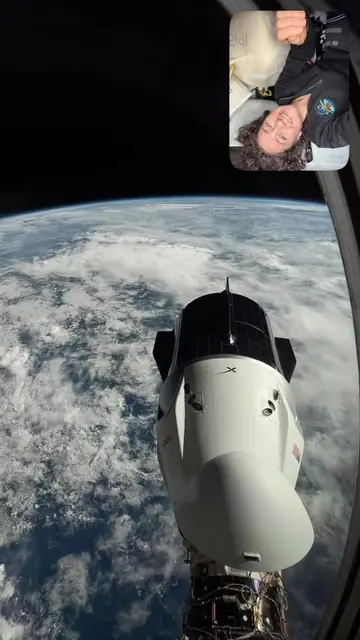
Good morning from my dragon lair.
- 00:02
Now that Crew 13 has arrived, I've given up my crew quarters and I'm camping out in my dragon vehicle.
- 00:08
Here's my view right next to my sleeping bag outside my window here, the earth and the Crew 13 dragon.
- 00:14
A gorgeous view.
- 00:16
Reminds me of my best piece of advice to them.
- 00:19
Remember to look out the window and realize where you are.
- 00:22
And I think that kind of advice goes for everybody down on earth as well.
- 00:26
Have a good day.
Sample Reels are public posts by NASA and its astronauts, shown only to demonstrate the transcript. TextFromReel is not affiliated with or endorsed by NASA.
How it works
- 1
Paste the Reel link
In the Instagram app, tap the share icon on a Reel and choose Copy link. On a computer, copy the address from your browser. Then paste it into the box above.
- 2
Pick a language (optional)
Auto-detect works for most videos. If the speaker mixes languages or has a strong accent, choosing the language yourself usually gives a cleaner result.
- 3
Copy or download
Hit Get Transcript. In a few seconds you'll see the text with timestamps. Copy one line, copy everything, or download it as TXT, SRT or VTT.
What you can do with a Reel transcript
Break down viral hooks
Read the first three seconds of a Reel that took off and see exactly how it grabs attention. Collect a few dozen and the patterns behind them start to show.

Take notes from tutorials
Cooking steps, workout cues, software tips: turn a fast-talking Reel into notes you can skim, search and keep.

Feed it to an AI assistant
Paste the transcript into ChatGPT or Claude to summarize it, pull out the key points or compare it with other videos. Text is far easier for these tools to work with than video.

Quote creators accurately
Cite a creator word for word in an article or a newsletter, or start from the transcript when you write about a video. Need subtitles instead? Download it as an SRT or VTT file.

Transcribe 50 Reels at once
Paste up to 50 links and each transcript lands in your history as soon as it's ready. Batch comes with every plan and credit pack.
- Up to 50 Reel links in one batch
- Every transcript saved to My transcripts
- TXT, SRT and VTT files, or the whole batch at once
- A failed link gives its credit back

Who uses an Instagram transcript
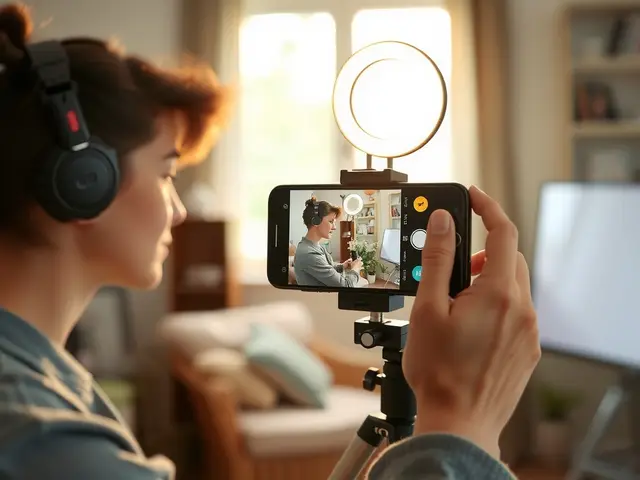
Creators
Study the scripts behind Reels that worked and reuse your own videos as captions, threads and posts.

Marketers
Track what competitors and brand partners actually say, not just what's in the caption.

Students and researchers
Quote short-form video accurately and keep searchable notes from the Reels you study.

Social media teams
Collect hooks for client briefs and share the text with teammates who never watched the video.
Why not just turn on Instagram's captions?
Instagram can show auto-generated captions while a Reel plays, but you can't copy them, search them or save them, and many creators switch them off. A transcript gives you the whole script as plain text, with timestamps, that you can paste anywhere.
What works and what doesn't
The generator works with public Instagram Reels and public video posts. If you can watch a video without logging in, we can usually transcribe it.
- Private accounts aren't supported. We only process content that anyone can see.
- Music-only videos get a "no speech detected" message instead of made-up text, and they don't use a credit.
- Transcripts cover videos up to 3 minutes long.
- Photo posts and Stories aren't supported. A transcript needs spoken audio in a Reel or video post.
- Each transcript uses one credit. If a transcript fails for any reason, the credit goes back to your balance.
Tips for a cleaner transcript
- Copy the link straight from the share menu. Links copied that way always work, even with the tracking bits at the end.
- Set the language by hand when a Reel mixes two languages, so the transcript doesn't switch halfway through.
- Check names, brands and numbers. Speech recognition hears sounds, not spelling, so unusual names are where mistakes show up most.
- Turn timestamps off before you copy if you only need the words, and back on when you want to find a moment in the video.
Frequently asked questions
How much does this Instagram transcript generator cost?
Each transcript uses one credit. Pro is $9.90 a month or $59 a year, with 300 transcripts a month either way. You can also buy one-time packs of 100 or 500 credits. There is no free plan.
Do I need an account?
Yes. Your credits live in your TextFromReel account, so you need to sign in to get a transcript. You never need to log in to Instagram or connect your Instagram account.
Can I get a transcript of a private Instagram video?
No. We only transcribe public videos, the ones anyone can watch without following the account. If a video is private, deleted or visible to followers only, you'll see a message saying so.
Which languages are supported?
Auto-detect handles dozens of languages, including English, Spanish, Portuguese, French, German, Hindi, Arabic, Japanese and Korean. You can also pick the language yourself from the menu under the link box.
What happens if the Reel has only music?
You'll see a message that no speech was detected. We filter out audio with no voice so you never get invented text, and you don't lose a credit.
How accurate are the transcripts?
For clear speech, accuracy is usually very high. Loud background music, several people talking at once, heavy slang or a noisy room can cause mistakes, so double-check names and numbers before you publish anything.
Comparing options? Our step-by-step guide on how to get an Instagram transcript covers captions and typing it out too, and the pricing page lists every plan and credit pack.
Get the text from your next Reel
Paste a public link and the transcript shows up in seconds.